
Free instant analysis
Reveal Airbnb revenue for any address or city
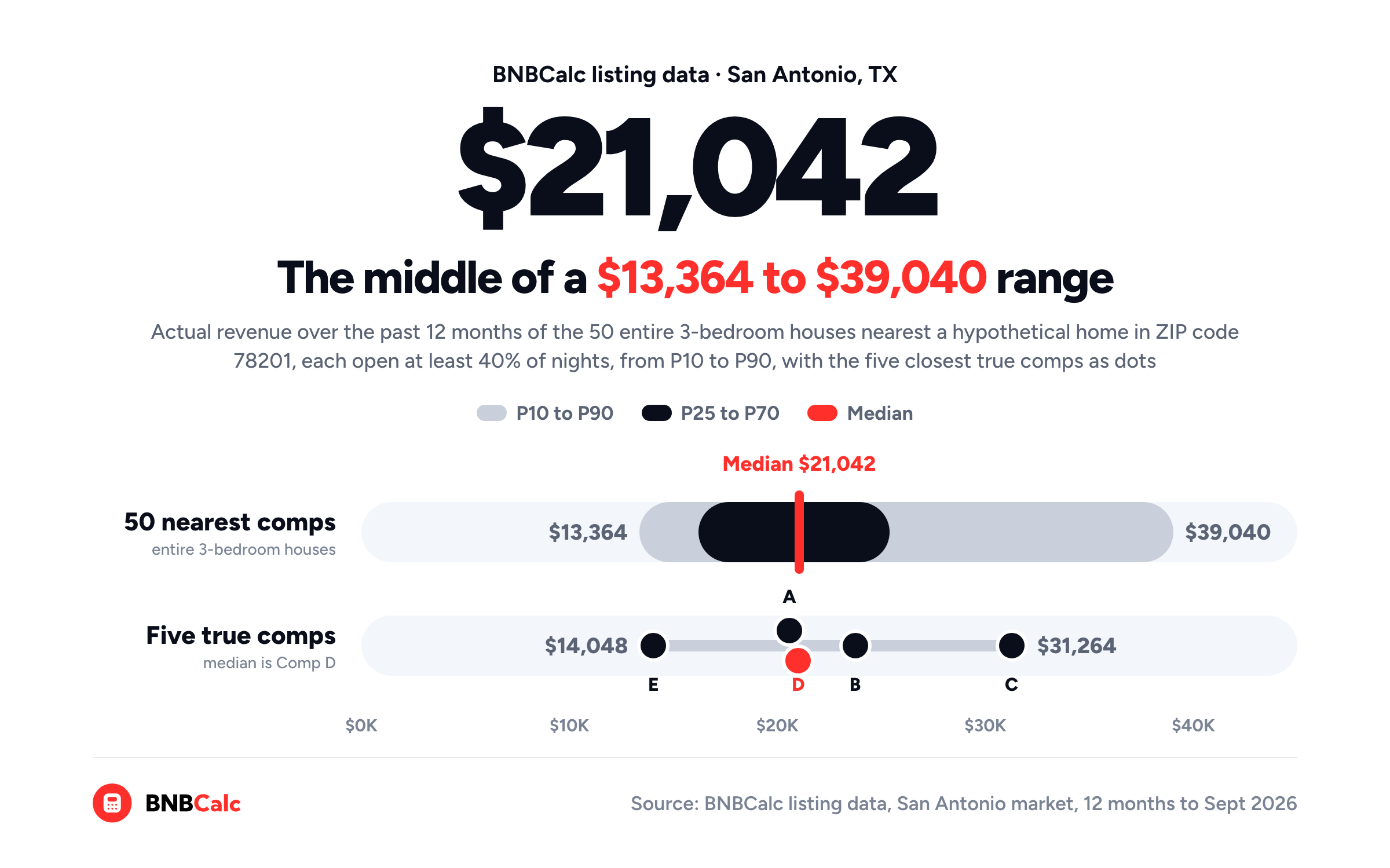
How accurate are Airbnb calculators, and how do you know whether an estimate will hold up for your house? Well, an estimate is only as accurate as its comps, so the one to trust is the one whose comps you've checked. When I pulled the comps for a hypothetical three-bedroom from BNBCalc's listing data for San Antonio, Texas, they earned a median $21,042 over the past 12 months, yet the nearby range ran from $13,364 at the 10th percentile to $39,040 at the 90th.
That spread is the part a single number hides. Every comp in it is a real listing near the house, so where yours lands depends on whether it earns like the ones at the top, in the middle or at the bottom.
I'll start with the five checks BNBCalc lets you run on its own estimate, and then I'll walk the same check by hand on that San Antonio house.
What Makes an Airbnb Calculator Estimate Accurate?
BNBCalc's own answer, on its Airbnb calculator page, is that accuracy depends on how closely the comps match your property, and that the more active comparable listings there are near an address, the more reliable the projection.
In practice, three things decide it: the property you describe, the comps behind the number, and what the number measures. The first two are as much on you as on the tool, since a calculator can only match comps to the address, bedrooms, bathrooms and guests you give it.
The third trips people up most, though. BNBCalc's revenue figures are gross bookings, meaning what guests paid for the nights they booked, cleaning fees included but not the guest's own service fee, before Airbnb's host fee or any of your costs come out.
Airbnb's service fee page says most hosts on its single fee pay 15.5%, so even a spot-on revenue estimate isn't what you'd keep. If you want to see the rest of the way, this guide to estimating a property's income takes one house from revenue to cash flow.
How to Check an Airbnb Calculator's Estimate Against Comps
If you've got a specific house in mind, the quickest place to check an estimate is the BNBCalc Calculator itself, because every number it shows comes with its comps. Here are the five checks I'd run, in order.
Step 1: Run the Exact Address With the Right Bedrooms, Baths and Guests
Start with the house's address or a Zillow link, never just the city, and check the bedrooms, bathrooms and guests before you run it. The Calculator flags the guest count as "Important for accurate revenue estimate", and the bedroom count decides which comps it looks for. It then pulls up to 50 comparable listings nearby, starting with entire homes that were open for booking at least 90 nights in the past year and have your number of bedrooms, or one more or fewer if it needs them.
Make sure the bedroom count is right above all, because changing it later in Edit fetches new comps and a new estimate, while changing the bathrooms or guests doesn't refresh the revenue.
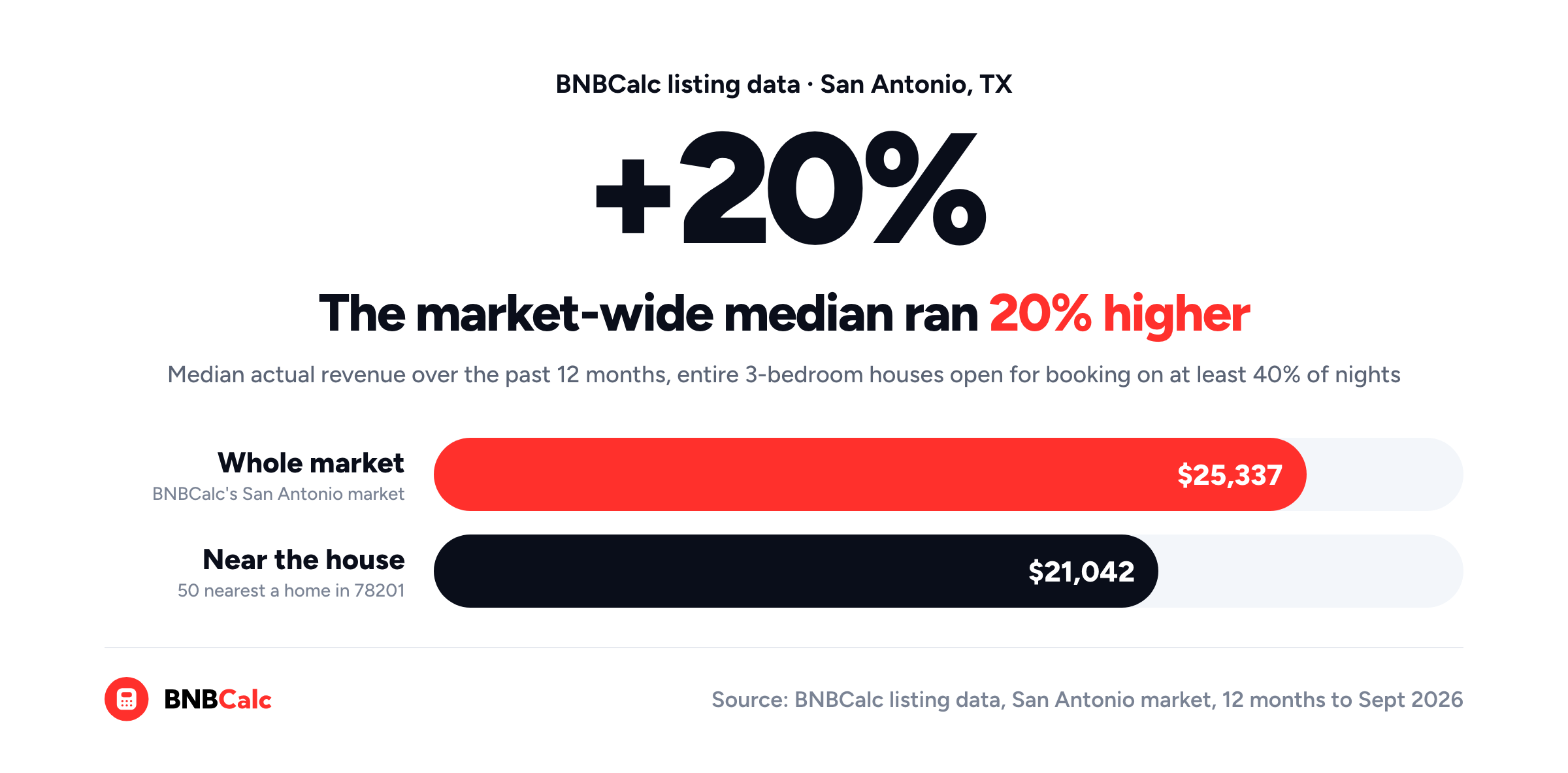
Why not just type the city? Because a city-wide figure is an area average, and when I ran the numbers on a San Antonio house, the market-wide median came out about 20% above the median of the 50 houses nearest it.
Step 2: Open the Comps Behind the Estimate
Next, I'd open the comps table and read it the way a guest would shop: would someone book this listing instead of yours? Each row shows a comp's revenue, nightly rate, occupancy, size, amenities and reviews, so a comp that doesn't belong usually stands out. If you untick its row, the estimate updates without it.
For a US property, AI Underwriter can do that screening for you when you run it, as long as it has photos of your house, either eight or more that BNBCalc finds or five or more you upload. It reviews each comp's photos, layout and amenities against yours, keeps about five of the closest matches, never more than eight, and sets your estimate at their median.
Each comp it keeps carries a "Why AI selected this comp" note, while each one it leaves out gets a "Why AI left this comp out" note in a folded list you can tick back in. Our launch post covers what AI Underwriter weighs when it picks comps.
Prefer to choose by hand? Select comps has filters for houses or apartments, for a pool, a hot tub or pets allowed, and for listings rated 4.8 or 4.9 stars and up.
Step 3: See Where the Estimate Sits in the Nearby Revenue Range
Once the comps look right, click How it's calculated under the headline number. Its nearby revenue range shows P10, P25, P50, P70 and P90 of all the comps, even the ones you've left out. P50 is the median, and P70 means about 70% of those listings earn less. The range is for comparison only, so it won't change your estimate, but it shows at a glance how far the comps spread and where your number lands.
So where does the estimate land?
By default, Select comps uses the median of the top-earning half of the comps, which sits roughly at the 75th percentile of all of them. As the window puts it, that's a benchmark for "a home set up properly, with pricing and multi-channel PMS software, that's available year-round and well managed."
Keep in mind that a brand-new analysis usually opens on the comps' 70th percentile instead, and only switches to that median after your first change in the revenue section, such as unticking a comp.
AI Underwriter, by contrast, uses the median of the few comps it judged closest to yours. Either way, once the comps and the property details are right, that optimized estimate is your baseline and your sanity check, the number you build your costs and your loan on.
Step 4: Match Actual or Potential Revenue to Your Calendar
Back in the comps table, each comp has two revenue figures. Revenue (Actual) is what it earned from real bookings over the past 12 months, while Revenue (Potential) is what it could earn if it were bookable all year, cleaning included. For comps from BNBCalc's own data, the nearby revenue range uses the potential figure.
Which one fits your plan?
That depends on your calendar. If you'll keep it open all year, potential describes what you're planning. If you'll block weeks for your own stays, expect to earn less than the comps could, the same way their own blocked nights already show up in their actual revenue. Our guide to running Airbnb comps shows how to split a comp's calendar into booked and host-blocked nights.
Step 5: Check the Comps' Performance Tiers in BNBCalc Markets
Finally, I'd check what kind of performers your comps are. In BNBCalc Markets, each listing's detail panel shows its actual revenue and host-blocked days along with a Performance rating: High, Average or Low against same-size listings in the market, judged on what it would earn if it were open every night. Switch the map's heatmap to Performance, or filter the Listings tab to one tier, and you'll see where the strong and weak performers sit around your address.
That shows you what kind of operation your comps represent. Where High performers sit near your address, look at what they offer that yours doesn't yet. Markets' Amenity revenue impact helps here, since it estimates how much more listings with an amenity like a pool or a hot tub earn, comparing similar listings, so you can see what guests pay more for before you plan on it.
How Much Would a 3-Bedroom Airbnb Make in San Antonio's 78201 ZIP Code?
Here's the same check, done by hand on BNBCalc's listing data. The example house is hypothetical, an entire three-bedroom, two-bath house that sleeps eight near the middle of the 78201 ZIP code northwest of downtown, while the comps are real listings with names and addresses left out. I've also assumed it can get a short-term rental permit, which you'd confirm against San Antonio's short-term rental rules before a real offer.
Keep in mind that BNBCalc's San Antonio market covers a region around the city: about seven in ten of its listings sit in San Antonio ZIP codes starting with 782, and about one in seven in New Braunfels.
First, I pulled comps much the way the Calculator does: entire three-bedroom houses open for booking on at least 40% of the past year's nights, then the 50 nearest the house, all within about two miles. Here's their range, built from what each one actually earned over the 12 months to September 2026.
| Point in the range | Actual revenue |
|---|---|
| P10 | $13,364 |
| P25 | $16,204 |
| P50 (median) | $21,042 |
| P70 | $25,408 |
| P90 | $39,040 |
Read it like the Calculator's window. The median was $21,042, about 70% earned less than $25,408, and about a tenth earned $39,040 or more, close to three times the $13,364 at P10. With a spread that wide, almost any number in it could be defended, so the next step is finding out which part of the range a house like this one belongs in.
Remember that the table uses actual revenue, what each comp earned with the calendar its host kept, while the Calculator ranks comps from BNBCalc's own data on full-year potential, which assumes a listing is open every night.
Next, I cut the 50 down to the five closest true comps, keeping two to three baths, six to ten guests, at least a year on the platform and at least 60 booked nights. Four are on Airbnb, and Comp E is on Vrbo, which BNBCalc's data covers too.
| Comp | Distance | Performance | Host-blocked nights | Actual revenue |
|---|---|---|---|---|
| A | 0.18 mi | Low | 11 | $20,575 |
| B | 0.23 mi | Average | 91 | $23,741 |
| C | 0.32 mi | Average | 76 | $31,264 |
| D | 0.38 mi | Average | 139 | $21,003 |
| E | 0.39 mi | Low | 158 | $14,048 |
Each row is one comp, nearest first, with the Performance rating from its Markets detail panel. Their median, Comp D's $21,003, sits just $39 below the median of all 50, so the closest matches landed in the middle of the range rather than at either end. Still, they spread from $14,048 to $31,264, and none of them is a High performer.
Comps A and D show why the tier is worth a look. They earned almost the same, but Comp A got there by staying open nearly all year, booking 216 nights at $96 a night on average, while Comp D was open 226 nights and blocked the other 139. That's why BNBCalc rates D an Average performer and A a Low one, since the rating compares what a listing would earn open every night with same-size listings across the market.
Comp E is the weakest evidence of the five.
Its host blocked 158 nights and it booked only 64, so I'd treat its $14,048 as a hint rather than a benchmark, the way you'd treat any heavily blocked comp.
What does that tell you about the house, then? The closest matches earned around the middle of the range, so earning toward the top of it, like Comp C's $31,264, comes down to performing like the stronger listings nearby, and Step 5's tiers and amenity estimates show what that takes.
Starting from a market-wide figure, meanwhile, would've had you about 20% off before you looked at a single comp. Across every entire three-bedroom house in BNBCalc's San Antonio market open that much of the year, the median was $25,337, compared with $21,042 for the 50 nearest the example house.
So, How Accurate Are Airbnb Calculators?
Airbnb calculators are as accurate as the comps behind them and the property you describe. Near the hypothetical San Antonio three-bedroom, the comps' median was $21,042, but the range ran from $13,364 at P10 to $39,040 at P90, and a market-wide median would've started about 20% higher.
So the most accurate estimate you'll get is one you've checked. Run the exact address through the BNBCalc Calculator, open its comps and AI Underwriter's reasons, see where the number sits in the nearby revenue range, and then use the optimized report as your baseline.
Any number for a house that hasn't hosted a guest yet is a forecast.
What makes one worth trusting is being able to point at the listings it came from and say why each one belongs.
Frequently Asked Questions
What Is the Most Accurate Airbnb Calculator?
The most accurate estimate is one built from comps you've checked, and the BNBCalc Calculator shows you every comp behind its number. If you run its AI Underwriter, it keeps about five of the closest matches and explains why it kept or left out each one, while its How it's calculated window shows the nearby revenue range. In BNBCalc's San Antonio listing data, the 50 three-bedroom houses nearest one hypothetical home ranged from $13,364 at P10 to $39,040 at P90 in actual revenue over the past year.
How Accurate Is BNBCalc's Airbnb Revenue Estimate?
BNBCalc's own answer is that accuracy depends on how closely the comps match your property, and that the more active comparable listings there are near an address, the more reliable the projection. That's why the BNBCalc Calculator lets you check its work: enter the exact address and size, open the comps and AI Underwriter's reasons, and see where the estimate sits in the nearby revenue range before you use the optimized report as your baseline.
Why Did My BNBCalc Estimate Change When I Changed the Bedrooms?
In the BNBCalc Calculator, a bedroom change fetches new revenue data, meaning new comps and a new estimate. Changing the bathrooms or guests is saved, but it doesn't refresh the revenue, so make sure all three are right before you run an address, and fix a wrong bedroom count in Edit.
What Does the Nearby Revenue Range Mean in BNBCalc?
In the BNBCalc Calculator's How it's calculated window, the nearby revenue range shows P10, P25, P50, P70 and P90 of all the comps. P50 is the median, and P70 means about 70% of those listings earn less. For comps from BNBCalc's own data, it uses each comp's full-year potential revenue, and it's there for comparison only, so it doesn't change your estimate.
BNBCalc Calculator Pricing and Free Analyses
When you've got a house to check, the BNBCalc Calculator costs $30 a month or $199 a year as of October 2026.
If you'd like to try it first, you can run two property analyses free, or start a 7-day free trial with full access.
The performance tiers and listing detail panels from Step 5 are part of BNBCalc Markets, which costs $79 a month or $399 a year and includes the full Calculator.
Airbnb Tax Deduction Calculator
Paying too much in taxes? We have the perfect solution. Simulate an Airbnb home purchase below.
Purchase Price
$450K
Structure Value
70%
Apply Trump's Tax Cut (Bonus Depreciation)
Depreciation
$117,695
Interest
$21,600
Tax
$6,750
Year 1 Deduction
$146,045
Want to claim this deduction? Get a free cost segregation benefit analysis from CSA Partners — no obligation.
Get Full Analysis