Free instant analysis
Reveal Airbnb revenue for any address or city
Is there an API that estimates Airbnb revenue for a specific address, and can it underwrite the whole deal for you? Well, yes: the BNBCalc API takes an address with its bedrooms, bathrooms, guests and purchase price, and sends back the revenue estimate, up to 50 comparable listings behind it, the expenses, cash flow, cap rate and cash-on-cash return, plus a hosted report link. As of October 2026, it costs $0 a month and $0.20 a report.
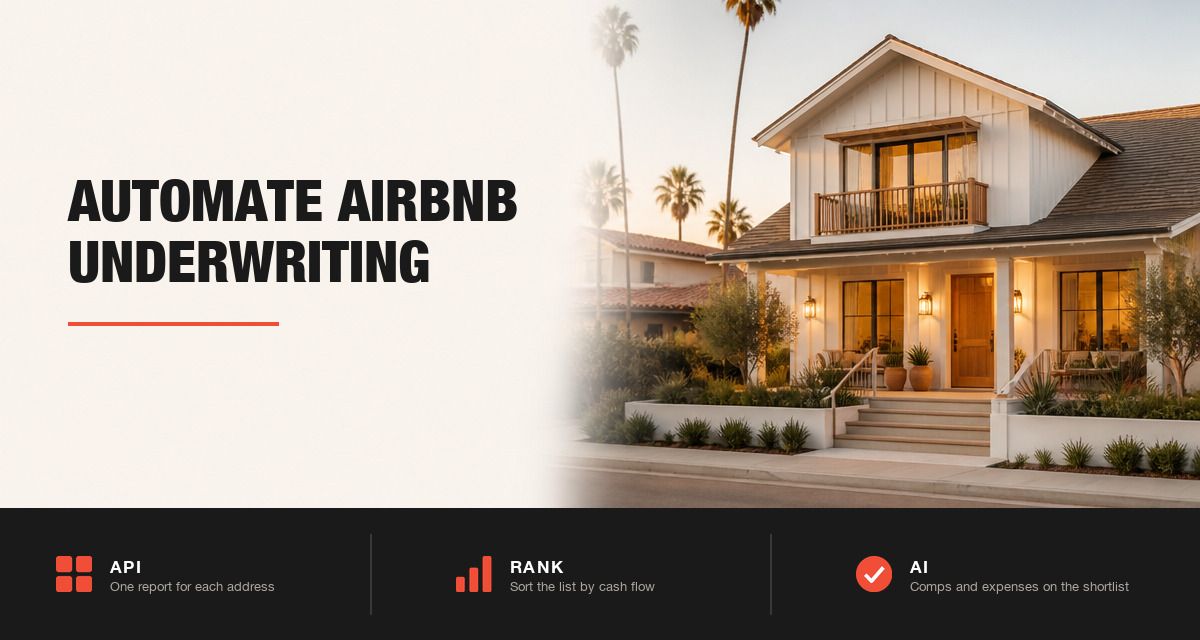
Since one call covers one house, automating it comes down to screening a list of addresses, ranking them by cash flow and pushing the results into whatever tool your team already uses. What trips people up is the financing inputs, the price of the AI features and the paid reports a script loses when it stops waiting too early.
So I'll walk through each step, then price a 200-address screen that comes to $44 at most, with AI on the 20 houses you'd make offers on.
What Does It Mean to Automate Airbnb Underwriting?
Underwriting a short-term rental by hand means one address at a time: you pull the comps, estimate the revenue, take out the expenses, add the loan and read the cash flow. By contrast, automating it means your software runs that same analysis on every address in a list, then sorts the list so a person only looks at the best few.
Which endpoint that software calls depends on the job.
| Who | What they automate | BNBCalc API endpoint |
|---|---|---|
| Buyer or investor | Screening a list of addresses before making offers | Buy |
| Agent or broker | Income estimates for clients, with a report link to send them | Buy |
| Lender | An income estimate and its comps for the property in a loan file | Buy |
| PropTech team | Estimated Airbnb income on every for-sale listing page | Buy |
| Co-host or operator | Revenue and commission quotes for owner leads | Cohost |
Most of these teams use the buy endpoint, because the purchase price is what turns a revenue estimate into cash flow, while a co-host pricing an owner lead uses the cohost endpoint instead.
If you only check a few addresses a week, though, the BNBCalc Calculator runs the same analysis in your browser, and the API earns its keep once software has to do it with nobody clicking. And since BNBCalc doesn't search homes for sale, you'll bring the list yourself, from an MLS export, your CRM or a listings feed. If you're still deciding which data API to build on, this comparison of short-term rental data APIs shows what each one returns and costs.
How to Automate Airbnb Underwriting With the BNBCalc API, Step by Step
The whole workflow runs on two of the API's five endpoints: one call creates a report for each address, and a second, optional call adds AI to the houses that make your shortlist.
Step 1: Get an API Key and Keep It on Your Server
Start in your BNBCalc account under Settings, then API, and click Start for free. You'll add a card there, since the API bills per report, but the subscription itself is $0 a month and you don't need a Calculator or Markets plan to use it. Then click Create New Key.
Every request carries that key in an x-bnbcalc-api-key header. BNBCalc's docs say to keep it on your server, out of browser or mobile code, and that matters because every successful call bills your account. If a key ever leaks, use Regenerate key, which stops the old one working immediately.
Step 2: Send Each Address to the Buy Endpoint
For a purchase, each address goes to the buy endpoint as a POST, with the location as a full street address or as latitude and longitude, plus the bedrooms, bathrooms, guest count and purchase price. The guest field is spelled accomodates, with one m, so make sure to type it exactly the way the API docs do, or the call comes back as an invalid request.
However, the financing inputs are narrower than you might expect. The buy call takes the purchase price and, if you send one, an interest rate, while the down payment and loan term come from BNBCalc's defaults of 20% down over 30 years, and the response shows the terms it used.
So send the rate from your own quote. In the example, I've used 6.00%, the Calculator's default and also what the API uses if you leave the rate out, while Freddie Mac's weekly survey put the average 30-year fixed at 7.40% as of October 15, 2026. Expenses start from BNBCalc's defaults too, since API analyses ignore any presets you've saved in the app.
import requests

URL = "https://atlas.bnbcalc.com/v1/external/analysis/create/buy"
HEADERS = {"x-bnbcalc-api-key": "YOUR_API_KEY", "Content-Type": "application/json"}

homes = [
    {"lat": 27.7676, "lng": -82.6403, "bedrooms": 3, "bathrooms": 2,
     "accomodates": 6, "purchasePriceUSD": 400000, "interestRatePercentage": 6},
]

results = []
for home in homes:
    r = requests.post(URL, headers=HEADERS, json=home, timeout=300)
    r.raise_for_status()
    body = r.json()
    d = body["data"]
    results.append({
        "id": d["_id"],
        "cash_flow": d["yearOneCashFlowUSD"],
        "cash_on_cash": d["yearOneCashOnCashPercentage"],
        "cap_rate": d["yearOneCapRatePercentage"],
        "report": d["url"],
        "warnings": body.get("warnings", []),
    })

results.sort(key=lambda x: x["cash_flow"], reverse=True)
The coordinates, room counts and $400,000 price are sample values from the docs' own example request, with a rate added and the call looped over a list, and each result keeps the analysis ID you'll need for the enhance call in Step 5.
Step 3: Read Revenue, Expenses and Returns From the Response
Each successful response carries the whole analysis, built on the same engine as the BNBCalc Calculator. Start with revenue: the year-one estimate with the nightly rate and occupancy behind it, then the 25th, 50th, 75th and 90th percentiles of each, so you can see how widely the comps run. Then come up to 50 comparable listings, each with its own revenue, occupancy, nightly rate, distance and photos.
Operating expenses come back as one monthly total, and for a US property, that total starts from defaults that include Airbnb's host fee at 15.5%, which is what most hosts on Airbnb's single fee pay, and cleaning at 8% of revenue. After that come operating income, Mortgage & Taxes, cash flow, cap rate and cash-on-cash return, all for year one.
Keep in mind that those returns follow the Calculator's definitions. Cap rate is operating income ÷ purchase price, with property tax counted in Mortgage & Taxes rather than in operating income, and cash-on-cash adds a year of revenue growth, 3% by default, to the cash flow before dividing by the cash you put in. This guide to cash-on-cash return and cap rate walks through both.
The response also carries a hosted report link, which you can send to a client or attach to a file. Make sure your code saves it with the numbers, because API analyses don't show up in your Properties list and there's no call for reading a report back later.
Step 4: Rank the List by Cash Flow
Why rank by cash flow instead of revenue? Because the revenue estimate doesn't know what you're paying for the house, while cash flow and cash-on-cash return do, so two houses that earn the same can land far apart once their prices go in. I'd sort by year-one cash flow, drop anything negative and read cash-on-cash beside it, since that's the return on the cash you'd put in. Cap rate leaves the loan out, so it's the one to compare if you haven't picked a lender yet.
Before you rank, make two adjustments in code. If you'll put down something other than 20%, keep the operating income from the response, since the loan doesn't change it, and subtract your own loan payment, property tax and any mortgage insurance. And if you'll pay a property manager, take their cut out too, because the API's management fee starts at 0%.
Then push the ranked list wherever your team works, whether that's a sheet, a CRM record or a page in your app, with the report link on every row.
Step 5: Add AI Comp Selection and AI Expense Estimates to the Shortlist
Which houses get the AI, then? I'd keep it for the shortlist. Send each of those analyses to the enhance endpoint with its analysis ID, plus addAIComps and addAIExpenseEstimates set to true. AI comp selection runs the same AI Underwriter the BNBCalc Calculator uses, so it reviews the comps' photos, layout and amenities against the house, keeps the closest matches and applies their revenue benchmark to the analysis. It only works for US properties with at least eight usable listing photos of the house, though.
AI expense estimates, meanwhile, replace BNBCalc's category defaults with estimates for that house, such as insurance, utilities, repairs and cleaning, while the platform fee, management fee and lodging tax stay as they are.
Enhance carries no report fee, so each AI feature that completes costs $0.10, and one that fails, times out or falls back costs nothing. You could set the same two flags on every create call instead, but then you'd pay for AI on houses you'll never offer on.
The enhance call returns the recalculated analysis, plus a note on whether the comp benchmark was applied, so re-rank the shortlist on the new numbers.
Step 6: Handle Errors, Rate Limits and Timeouts
What happens when a call fails? Nothing lands on your bill, because failed requests are free, and most errors cost you a retry and nothing more. A 400 means a bad parameter, a 401 a bad key, a 404 an analysis ID that doesn't exist, and a 429 a limit you've hit.
Plain reports can go out at 100 requests a second, while AI calls are held to 10 a minute per key with 2 in flight, and enhance to 5 a minute. When an AI limit trips, the 429 comes with a Retry-After header, so have your code wait that long rather than retry straight away.
Timeouts need more care. AI calls have a 90-second budget, and BNBCalc's docs say to set your client timeout to at least 300 seconds, because if your code gives up early, the server can still finish and bill a report you'll never see.
On top of that, check the warnings list on every successful response. An AI request that couldn't finish still leaves you a valid analysis, with a warning starting ai_comps_ or ai_expense_estimates_ that says what was skipped, such as photos that weren't ready in time. Retry those through enhance with the same analysis ID rather than creating the report again, and if the comp summary says fewer than four comps backed the benchmark, send that address to a person.
How Much Does the BNBCalc API Cost for 200 Addresses?
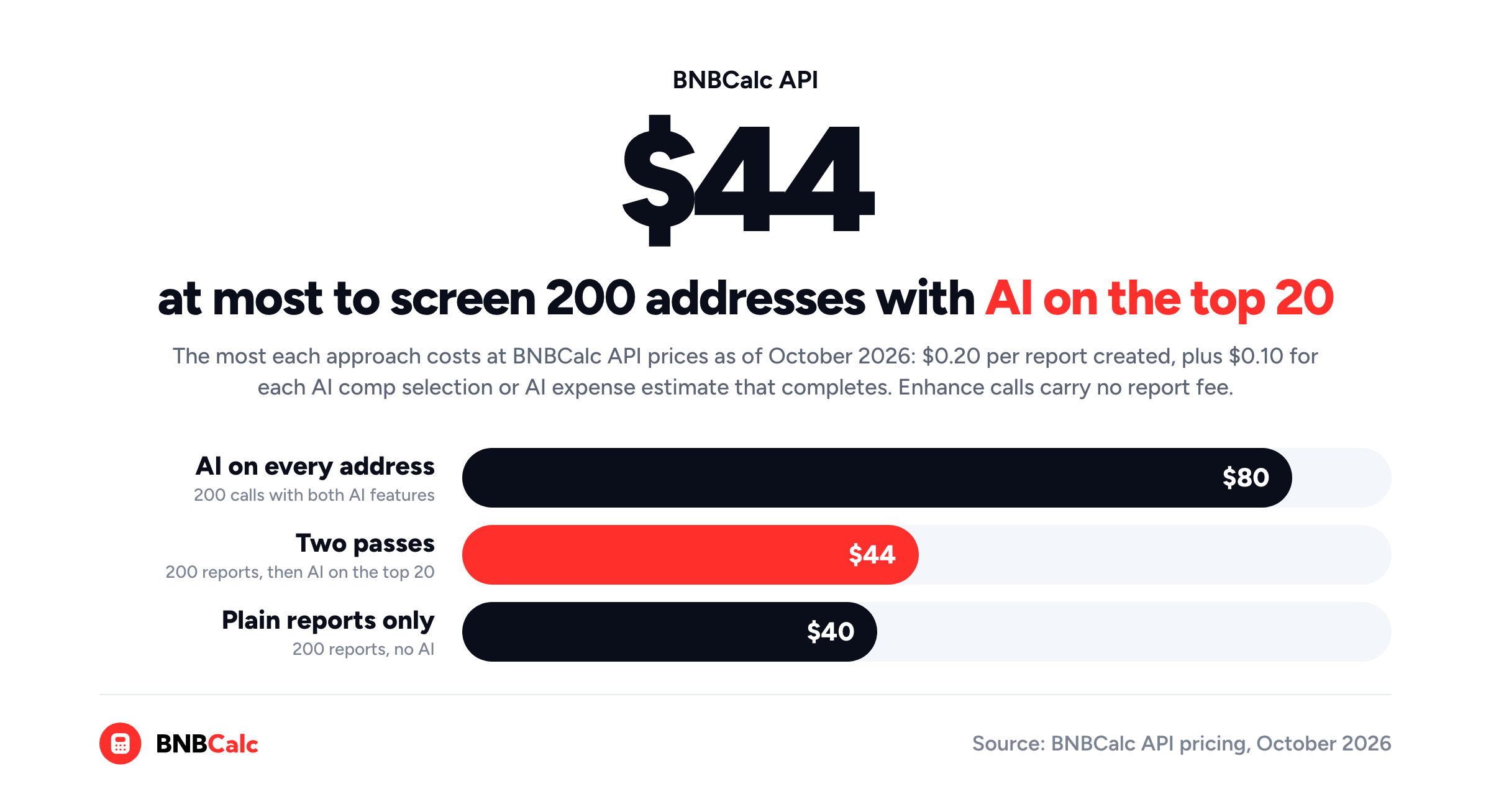
Say you've got 200 for-sale addresses to screen this month, and you'd make offers on the top 20. What would that cost? At October 2026 prices, there are three ways to run the list, and I'd pick the second one.
| Approach | What you send | Most you'd pay |
|---|---|---|
| Plain reports only | 200 create calls | 200 × $0.20 = $40.00 |
| Two passes | 200 create calls, then 20 enhance calls with both AI features | $40.00 + 20 × $0.20 = $44.00 |
| AI on every address | 200 create calls with both AI flags | 200 × $0.40 = $80.00 |
Each row is one way to run the same list, and the last column is a ceiling, since AI that doesn't complete isn't billed. For $4 more than plain reports, the two-pass run puts AI comp selection and AI expense estimates on the 20 houses that matter, for a little over half the cost of AI on everything, or $0.22 an address on average. It finishes sooner, too, because only 20 calls have to queue behind the AI limits instead of 200.
What Can't an Automated Airbnb Analysis Tell You?
An API estimate is a benchmark rather than a promise, and BNBCalc's own pricing page says as much: its figures are "market benchmarks, and actual results vary by property and operations." That's why I'd treat the ranked list as a shortlist, not a verdict.
Coverage is strongest where plenty of comparable short-term rentals sit near the address, so BNBCalc's API guide suggests reviewing sparse rural areas, heavily restricted locations and unusual property types more carefully.
No dataset knows whether you're allowed to rent the house short term, either. In San Francisco, for example, you must be the permanent resident of the unit you rent, living there at least 275 nights a year and renting it out un-hosted for no more than 90. A house bought only to rent short term doesn't qualify there, so make sure to check every finalist against the local short-term rental rules before you trust its cash flow.
Finally, run each finalist through the BNBCalc Calculator, where you can open the comps, adjust the expenses and set your exact down payment, then use the optimized report as your baseline for the offer.
So, How Do You Automate Airbnb Underwriting With an API?
You send every address on your list to the BNBCalc API's buy endpoint with its bedrooms, bathrooms, guests, price and rate, rank the cash flow that comes back, and save the hosted report link on every row. Then you add AI comp selection and AI expense estimates to the shortlist through enhance, which keeps a 200-address screen to $44 at most at October 2026 prices, and you handle the warnings, limits and timeouts so no paid report goes missing.
Software is good at the first pass, so let it do the sorting. That way, the afternoon a person spends on a house goes to one that has already cleared the numbers.
Frequently Asked Questions
Is There an API That Estimates Airbnb Revenue for a Specific Address?
Yes. The BNBCalc API takes an address or coordinates with the bedrooms, bathrooms and guest count and returns a revenue estimate, nightly rate, occupancy, percentile bands, up to 50 comparable listings and a hosted report link. A buy analysis adds the purchase price, so it also returns cash flow, cap rate and cash-on-cash return, all for $0.20 a report as of October 2026.
How Much Does the BNBCalc API Cost per Property?
The BNBCalc API charges $0.20 for each report it creates, plus $0.10 for AI comp selection and $0.10 for AI expense estimates, each only when it completes, as of October 2026. Failed requests cost nothing, and enhance calls carry no report fee, so screening 200 addresses and adding both AI features to the top 20 costs $44 at most.
Do You Need a BNBCalc Subscription to Use the API?
No. BNBCalc API access is its own $0-a-month subscription, which you start under Settings, then API, in your BNBCalc account, and you don't need a Calculator or Markets plan alongside it. You'll add a card, because each report it creates is billed at $0.20, and you can cancel API access from the same page.
Can the BNBCalc API Use My Own Loan Terms?
The BNBCalc API's buy endpoint takes your purchase price and interest rate, but the down payment and loan term use BNBCalc's defaults of 20% down over 30 years, which the response shows. If your terms differ, keep the operating income it returns and subtract your own loan payment, property tax and any mortgage insurance. The owned endpoint takes full mortgage terms, but it's built for a property you already own.
Is the BNBCalc API's Revenue Estimate a Guarantee?
No. The BNBCalc API's revenue estimate is a benchmark built from comparable listings near the address, on the same engine as the BNBCalc Calculator, and BNBCalc's pricing page says actual results vary by property and operations. Each response's percentile bands show how widely the comps' revenue runs, and for a US property, AI comp selection can base the estimate on the closest matches.
BNBCalc API Pricing and Free Analyses
The BNBCalc API costs $0 a month plus $0.20 for each report it creates, with $0.10 more for each AI comp selection or AI expense estimate that completes, as of October 2026. If you're planning high-volume batch analysis, custom onboarding or white-label reports, BNBCalc's API pricing page says to contact the team instead.
If you'd like to see the analysis before you write any code, you can run two property analyses free in the BNBCalc Calculator, or start a 7-day free trial with full access. After that, the Calculator costs $30 a month or $199 a year.
Airbnb Tax Deduction Calculator
Paying too much in taxes? We have the perfect solution. Simulate an Airbnb home purchase below.
Purchase Price
$450K
Structure Value
70%
Apply Trump's Tax Cut (Bonus Depreciation)
Depreciation
$117,695
Interest
$21,600
Tax
$6,750
Year 1 Deduction
$146,045
Want to claim this deduction? Get a free cost segregation benefit analysis from CSA Partners — no obligation.
Get Full Analysis