
Analisi istantanea gratuita
Scopri i ricavi Airbnb per qualsiasi indirizzo o città
The closest Airbnb is not always the best comparable.
A nearby two-bedroom apartment and a two-bedroom cabin may look similar in a spreadsheet, but guests see two completely different stays. Photos, design, amenities, capacity, and overall quality all shape what a property can charge and earn.
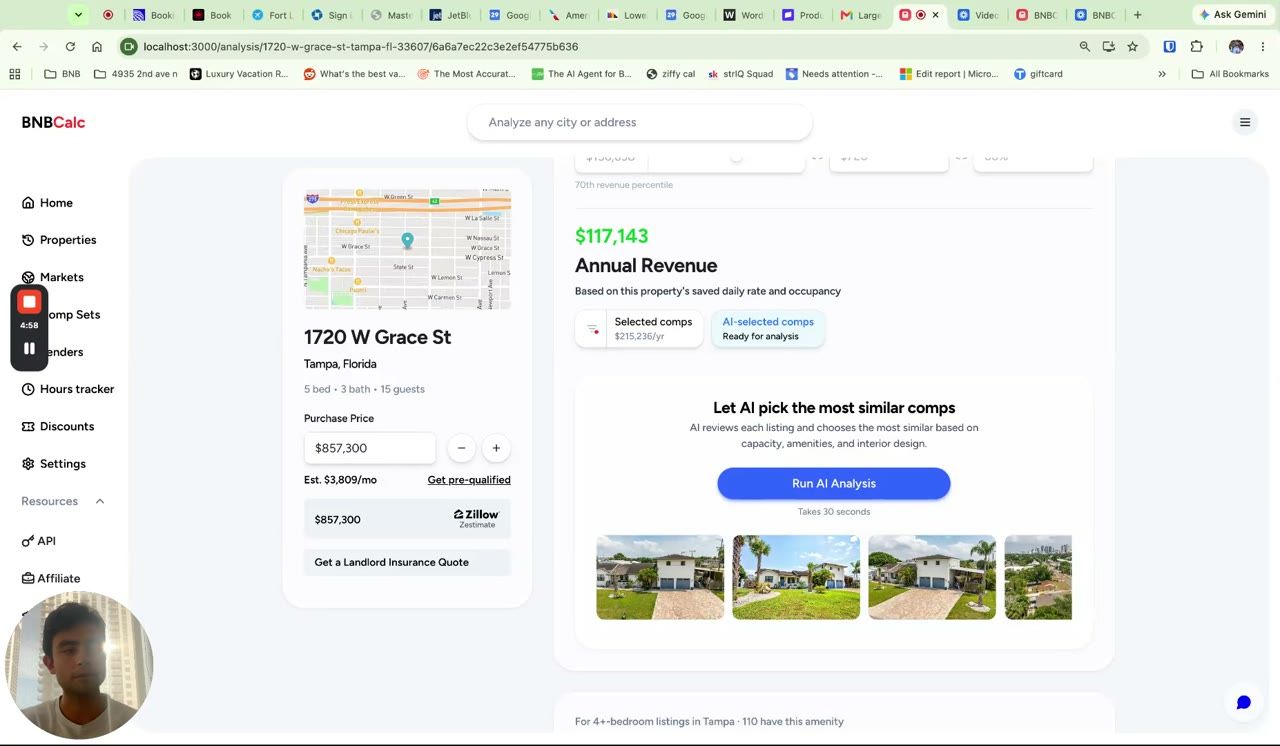
That is why BNBCalc now includes AI-selected comps. The feature reviews the nearby rentals in your analysis and finds the properties that look and operate most like the one you are evaluating. You get a more relevant comparison set, a revenue forecast built on stronger evidence, and every selected listing remains available for you to inspect.
See AI-Selected Comps in Action
See how BNBCalc reviews nearby rentals, builds a similar comp set, and updates the revenue forecast.
Better Matches Than Distance Alone
Traditional comp searches usually begin with the basics: location, bedroom count, bathroom count, and distance. Those details matter, but they do not tell the whole story of a short-term rental.
AI-selected comps can consider the signals guests respond to when choosing a stay:
- Property details and guest capacity
- Listing photos and interior presentation
- Amenities that change the guest experience
- Similarity in size and property type
- Rental performance and positioning
The result is a comp set designed around the actual property instead of a loose group of rentals that happen to be nearby.
A Forecast You Can Explain
Revenue projections are easier to trust when you can show where the number came from. AI-selected comps keeps the underlying listings visible, including their revenue, occupancy, nightly rate, location, and property details.
That makes the feature useful beyond a quick underwriting decision. Investors can review the evidence before making an offer. Realtors can walk clients through a rental-income opportunity. Property managers and cohosts can support an owner proposal with nearby examples that make sense for the home.
AI helps narrow the field, but you stay in control of the decision.
How to Use AI-Selected Comps
- Run a property analysis. Enter an address or import the property you want to evaluate.
- Open the comparable revenue section. Choose the AI-selected comps view and run the analysis.
- Review the matches. Open the selected listings, compare their details, and see the resulting revenue forecast.
- Compare your options. Move between AI-selected and manually selected comps whenever you want another view of the opportunity.
There is no new spreadsheet to build and no separate comp tool to learn. The feature lives inside the BNBCalc analysis you already use.
Built for Properties That Are Hard to Compare
AI-selected comps is especially useful when a property does not fit neatly into the local average.
A large home built for groups should not be judged against every listing with the same bedroom count. A design-forward cabin, waterfront stay, pool property, or amenity-rich vacation rental needs comparisons that reflect why guests would choose it.
The feature helps surface those differences earlier, before a weak comp quietly pulls the forecast too high or too low.
Frequently Asked Questions
Does AI Replace Manual Comp Selection?
No. AI-selected comps gives you another way to build the comparison set. You can still review nearby listings and select comps manually whenever you prefer.
Can I See Which Properties the AI Selected?
Yes. The selected listings remain visible in the analysis, so you can review their photos, property details, performance, and location before relying on the forecast.
What Does the AI Compare?
It reviews available property details, photos, amenities, guest capacity, rental performance, and location to identify nearby stays that are more similar to the subject property.
Who Is AI-Selected Comps For?
The feature is built for short-term rental investors, realtors, property managers, cohosts, and operators who need a faster way to find relevant comps and explain a revenue forecast.
Try AI-Selected Comps on Your Next Property
The best comp set is the one that reflects the stay guests are actually choosing. Reveal any property's Airbnb profitability, run AI-selected comps, and review the evidence behind the forecast.
You can also see how AI expense estimates tailor operating costs to the property and local market.
Airbnb Tax Deduction Calculator
Paying too much in taxes? We have the perfect solution. Simulate an Airbnb home purchase below.
Purchase Price
$450K
Structure Value
70%
Apply Trump's Tax Cut (Bonus Depreciation)
Depreciation
$117,695
Interest
$21,600
Tax
$6,750
Year 1 Deduction
$146,045
Want to claim this deduction? Get a free cost segregation benefit analysis from CSA Partners — no obligation.
Get Full Analysis